

About the Author – Phishing in the modern world.
In today’s digital age, phishing scams are increasingly prevalent and pose a significant threat to online security. While some may not be familiar with the term “phishing,” it is synonymous with “scam.” By definition, phishing refers to the fraudulent practice of sending emails or other messages that appear to be from reputable companies, intending to trick individuals into revealing personal information such as passwords and credit card numbers.
Phishing is not a one-size-fits-all attack; it comes in various forms, including spear phishing and smishing. Each type employs different tactics but shares the common goal of deceiving victims and stealing sensitive information. In this article, I will delve into the different types of phishing, explain how they operate, and provide tips on identifying and protecting yourself from these malicious schemes.
What is Phishing?
Phishing, by definition, is:
/fiSHing/
- The fraudulent practice of sending emails or other messages purporting to be from reputable companies to induce individuals to reveal personal information, such as passwords and credit card numbers.
Bad actors who conduct phishing scams often cast a wide net to catch as many victims as possible. They typically start with a topic that grabs attention, such as account issues with banks, email providers, Amazon, Netflix, or other popular services. These messages always emphasize urgency, attempting to panic the recipient into action.
A common trait among phishing emails is poor spelling and obvious mistakes. While this is sometimes true, it is not always the case. So why do some phishing emails contain deliberate errors? These mistakes filter out individuals who are more vigilant and detail-oriented, making it easier for scammers to identify those who are less cautious and, therefore, easier targets.
In a broad phishing campaign, scammers rarely use the recipient’s name or provide any specific information, as they aim to reach as many people as possible with a single message. The primary goal of these emails is to elicit a response through a call to action. Common tactics include prompting the recipient to click a link to log in to an account, reply to the email, or download an attachment containing a malicious payload.
In today’s digital landscape, simply avoiding clicking on suspicious links is no longer sufficient to ensure safety. With new vulnerabilities being discovered in email clients like Outlook, even just receiving a malicious email can compromise your system. This type of attack is a zero-click attack, highlighting the importance of being vigilant and cautious with all unsolicited communications.
Phishing Red Flags
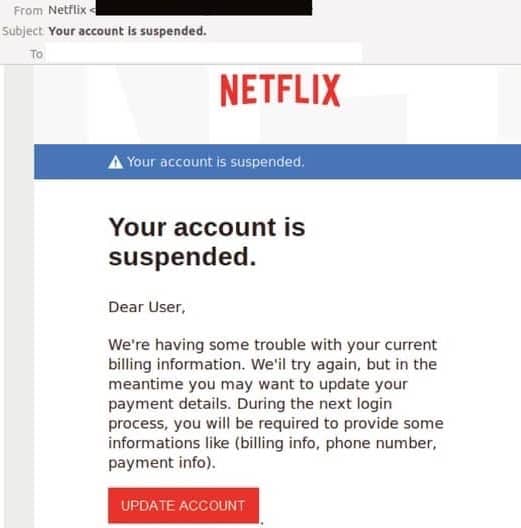
Identifying phishing emails can sometimes be challenging, but there are several red flags that can help you spot them. Let’s take a look at an example email purportedly from Netflix, titled “Your account is suspended.”
- Shocking Subject Line
- The title of the email is designed to cause concern and urgency. “Your account is suspended” is meant to prompt immediate action from the recipient without thinking critically about the email’s legitimacy.
- Generic Greeting
- The email begins with “Dear user” instead of addressing the recipient by their real name. Legitimate companies, like Netflix, will typically use your name in their communications.
- Incorrect Personal Information
- The content of the email may include incorrect billing information, phone number, or payment details. Legitimate companies usually have accurate information about their customers.
- Call to Action Button
- The email includes a prominent button urging the recipient to update their information. This button often leads to a fake website designed to steal personal information.
- Suspicious Links
- The links in these emails usually lead to phishing websites that mimic the real site. Always check the URL before clicking and ensure it exactly matches the legitimate site.
You can better protect yourself from these scams by being aware of these common phishing red flags. Always scrutinize unexpected emails and think twice before clicking on any links or providing personal information.
What is Spear Phishing?
Spearfishing is a targeted attempt to steal sensitive information, such as account credentials or financial information, from a specific individual by masquerading as a trustworthy entity, often for malicious reasons.
Spear phishing is a more targeted and sophisticated form of phishing. Unlike general phishing, which casts a wide net hoping to catch anyone, spear phishing targets specific individuals or organizations. The attackers often conduct thorough research on their targets to make their fraudulent messages more convincing.
A spear-phishing attack might involve an email that appears to come from a trusted source, such as a colleague, business partner, or a familiar organization. The message is carefully crafted to address the recipient by name and may include specific information relevant to them, making the email seem legitimate.
The primary goal of spear phishing is to trick the recipient into divulging sensitive information, such as login credentials, financial information, or other personal data. The email might contain a malicious link leading to a fake login page or an attachment with malware designed to compromise the recipient’s system.
Spear phishing attacks are particularly dangerous because they are harder to detect and can cause significant harm if successful. They often target high-value individuals, such as executives or employees, who have access to critical systems and data.
To protect against spear phishing, it is crucial to remain vigilant and verify the authenticity of unexpected emails, especially those requesting sensitive information. Educating employees about the dangers of spear phishing and implementing robust security measures can help mitigate the risk of these targeted attacks.
What is Smishing?
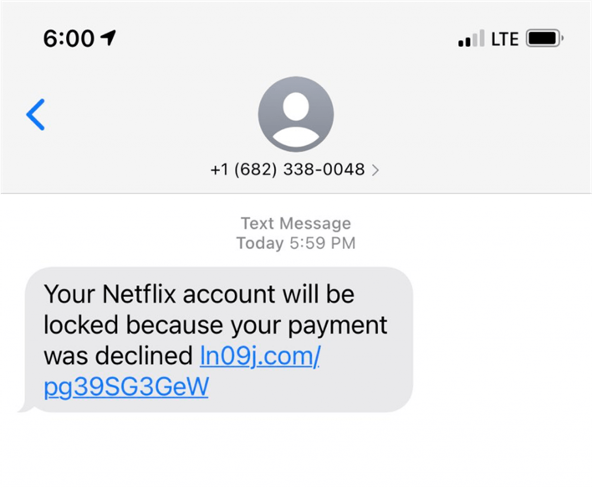
Smishing is a type of phishing attack where fraudulent messages are sent via SMS (text messages) to trick individuals into revealing personal information or downloading malicious software.
Smishing, short for SMS phishing, is a cyber-attack where scammers use text messages to deceive recipients into divulging sensitive information or downloading malware. These attacks exploit the trust and urgency associated with SMS communication to manipulate victims.
A typical smishing attack involves a text message that appears to come from a legitimate source, such as a bank, service provider, or well-known company. The message often includes alarming or enticing information designed to prompt an immediate response, such as a claim about a problem with your account, a prize you’ve won, or a security alert.
The text message usually contains a link or a phone number. Clicking on the link might take you to a fake website that mimics the legitimate site, where you’re asked to enter personal information such as login credentials, credit card numbers, or social security numbers. Alternatively, the link could trigger a download of malware that compromises your mobile device.
Smishing can be particularly effective because people tend to trust text messages more than emails and often react quickly without thoroughly scrutinizing the message. This sense of urgency and trust makes it easier for scammers to succeed in their attacks.
To protect yourself from smishing, be cautious with unsolicited text messages, especially those asking for personal information or urging immediate action. Verify the message’s authenticity by contacting the organization using a known and trusted communication method. Avoid clicking on links or calling phone numbers provided in suspicious texts. Implementing security measures such as two-factor authentication and updating your mobile device can also help safeguard against smishing attacks.
Summary
In today’s interconnected world, phishing attacks are becoming increasingly sophisticated and prevalent. Understanding the different types of phishing—general phishing, spear phishing, and smishing—is crucial for protecting your personal and financial information. Each type of attack has its methods and tactics, but they all share the common goal of deceiving individuals into revealing sensitive data.
To protect yourself against these attacks, consider the following strategies:
- Stay Vigilant: Always scrutinize unsolicited emails, text messages, and communications. Look for red flags such as generic greetings, urgent requests, and suspicious links or attachments.
- Verify Sources: Verify the message’s authenticity before clicking on links or providing personal information. Contact the organization directly using known and trusted communication methods.
- Educate Yourself and Others: Learn about common phishing tactics and educate your friends, family, and colleagues. Awareness is a powerful tool in preventing phishing attacks.
- Use Strong, Unique Passwords: Employ strong, unique passwords for your accounts and update them regularly. Consider using a password manager to keep track of your passwords securely.
- Enable Two-Factor Authentication (2FA): Enabling 2FA on your accounts adds an extra layer of security. This ensures that even if your password is compromised, an attacker still needs access to your second factor (e.g., your phone) to gain entry.
- Keep Your Software Updated: Regularly update your operating system, browsers, and any other software to protect against known vulnerabilities that attackers might exploit.
- Be Cautious with Links and Attachments: Avoid clicking links or downloading attachments from unknown or untrusted sources. Hover over links to see the actual URL before clicking.
- Use Security Tools: Utilize antivirus software, firewalls, and email filters to help detect and block potential threats.
Following these practices can significantly reduce your risk of falling victim to phishing attacks. Stay informed, stay cautious, and protect your digital life from cyber threats.
Thank you for reading, and stay safe online!
Pingback: Start Dark Web Monitoring for Maximum Protection